Video and written reviews of various products.

OVO Digital Photo Album / Frame - 3.5″ Display

Author Thomas | 30.08.2008 | Category Electronics

The OVO 3.5″ Digital Photo Album is one of kind.  It’s sleek design and ease of operation makes it a great choice.  Depending on the size of the pictures imported to the album, it can hold over 1,000.  Slide show mode makes it easy to share pictures.

The OVO digital photo frame comes with a stand so it can stand upright on a desk.  It’s battery is rechargeable and is charged when connected to your computer.

The photo album comes with a slip case, USB cable, software, and instructions.

Digital Photo Keychains

Author Thomas | 11.07.2008 | Category Electronics, Home & Garden

There are a lot of “interesting” digital photo key chains out there, but one trumps them all.  The MX Digital Photo Keychain has a metal backing similar to the ipod (very nice looking). It can store around 100 (re-sized) pictures.

The software is included in the photo frame and works through your computer’s USB port. It also has a calendar and clock features.

Also available in white:

Sansa Fuze Case 3-in-1 Kit (Armband, Case, Sleeve)

Author Thomas | 05.07.2008 | Category Accessories, Electronics

A great case combination for the Sansa Fuze. Rising quickly in popularity, the Sansa Fuze is finding its way into homes across the world, but so far, there are not that many accessories for the mp3 player as many manufacturers focus on the Apple iPod. Fortunately, a few good accessories are out there.

The Sansa Fuze Case kit contains an armband for running/jogging, a hard-shell protective case for travel, and a leather-like sleeve for every day use protection.

We tested the Fuze in the case. It fits quite snug but still works great. The “hard-shell” case helps to protect the player if you toss it in your bag when on the go.

The sleeve works with the armband, so you can take it off the armband and still use the protective sleeve and also cuts down on space and material used.

The armband fits the device well, and because the Fuze is small, the armband and the Fuze together don’t feel like they weigh all that much on your arm. A video iPod on the other hand (or arm as the case may be) is more bulky and heavy to go jogging with compared to the Fuze (just FYI, the Sansa Fuze has an FM tuner in it so you can listen to the radio while you’re out and about).

See the case at: Sansa 3 in 1 Fuze Kit (Armband, Travel Case, & Leather-Grained Protective Glove)

Nikon D60 Digital SLR Camera Review

Author Thomas | 20.05.2008 | Category Electronics

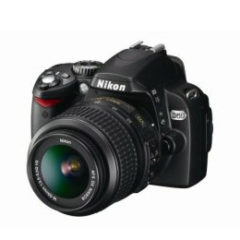
The Nikon D60 is a great camera. It fits into the palm of your hand very well and takes great pictures. Sold in many different lens kit combinations, one of the most popular is with the 18-55mm lens and the 55-200mm lens both offering vibration reduction (more on that later).

Easy to use Presets - This is a camera for beginners, but pack enough punch for the pros. What’s great about the Nikon D60 is that it has presets for taking different types of pictures. Portraits, sports pictures, pictures of children (who won’t stay still very long for example), vistas, night shots, auto select, and more. You’ll learn about aperture and shutter speed and many more photo terms in time, but until then you can make use of the quick setting dial to select what type of photo situation you’re in.

If you want a camera that is easy to use from the get go (compared to other DSLRS, this is it). However, the camera has enough power behind it that a professional photographer could use it and still tweak the settings. So this is a camera that will grow with you so-to-speak.

Solid Construction - The camera feels like it’s heavy duty. It’s got a solid construction and doesn’t feel at all like the look-alike cameras made all of plastic.

Lenses - The 18-55mm lens is great for taking everyday pictures. The 55-200 lens is fantastic for zooming in on a subject; however, the lens is heavier and thus it’s harder to hold the camera still. You might want to look into a tripod or monopod to help hold the camera steady when using larger lenses or using slower shutter speeds.

I went to an NBA playoff game and sat 3rd row from the very top in the arena. Using a 200mm lens that came as part of the kit, I was able to zoom in and take some great photos (when my pictures are not so amateurish, perhaps I’ll post some).

Using the 55-200mm lens we snapped a picture of the moon. The black sky is cropped from the original, but you can see lots of detail on the moon.

Moon

Fuzzy Backgrounds - By far, the best thing I enjoy about using this camera is the ability to take a picture / portrait of someone and have the background be fuzzy thus creating a sharpness around the subject. Now you can do so with other less expensive cameras, but wanting to take great photos, I wanted a great, not just a good, camera.

blossom

Vibration Reduction - The D60 kit has Vibration Reduction (VR) built into the lenses and not into the camera body itself. From the Nikon material I read, this is supposed to be better than having the VR in the camera body.

Nikon D60 Side View

SD Memory Card Types - I tried a slow speed SD Memory and a Class 6, 8 Gigabyte SDHC Memory card and it appeared that both took the ~3 pictures per second at the same rate. From what I’ve read, the D60 has a buffer that will capture the pictures and then transfer them to the card.

So you don’t necessarily need the latest and greatest SD memory card, however, when you transfer pictures from the card to your computer, the fast the card, the faster the transfer will be. I did notice that transferring pictures to my computer was A LOT faster using the SDHC Class 6 card.

The Kit - I’m glad I got the D60 with the two lenses. The 18-55mm lens is great, but if I really need to zoom in, the 55-200mm does the job very well. Add a bag to your purchase. You don’t want to get a great camera only to go cheap on a bag that won’t protect your investment. Standard with each D60 is a neck strap. Use it so you don’t drop your camera. With all the peripherals, set a budget for yourself.

Accessories - Once you purchase your camera, you’ll find yourself headed back to purchase additional accessories that make using the camera even more fun. You can find the accessories online for very good prices.

One accessory that fits many Nikon SLR cameras (and yes, it does work for the D60) is the Nikon ML-L3 Wireless Remote Control. The remote lets you operate the shutter release without touching the camera. This is a great tool if you are taking pictures with a slow shutter speed or are taking a picture of a group, and you’re in the group. You don’t have to set the timer, run back to the group, have the picture taken, then go back and do it again because no one was looking. You can just hit the button on the remote and the shutter will release.

Where - The D60 is for sale on Amazon (with training DVD’s) at the following link: Nikon D60 10.2MP Digital SLR Camera with 18-55mm f/3.5-5.6G AF-S DX VR and 55-200mm f/4-5.6G ED IF AF-S DX VR Zoom-Nikkor Lens with 2 Nikon School DVD

iPod Touch

Author Thomas | 05.04.2008 | Category Uncategorized

iPod Touch Launched in October 2001, the iPod mp3 player captured the attention of millions around the world. Each year, Apple, who makes the iPod, released better models incorporating color displays, the ability to display pictures, video, and better and better storage capacity and battery life.

We watched 14 different classes of iPod come through the development pipeline, but we never purchased one because we knew there would be one that would be worth waiting for.

The only mp3 player we had ever purchased was purchased in 2002 or 2003 and was a Rio 128 Megabyte mp3 player. Very small compared to the iPods being released then, but at least it was something within our price range.

When the iPod Touch was released in September of 2007, we knew that was the iPod we wanted. The iPod Touch has the ability to:

  • Connect to the Internet using the Safari web browser.
  • Has a direct interface into YouTube.
  • The ability to play videos (on a much larger screen than the previous iPods.
  • Play music and display the lyrics to the song being played (if you’ve added the lyrics through iTunes.
  • Scroll through your songs by touch.
  • Access iTunes
  • Check email
  • Display pictures
  • Take and email notes
  • Open documents from emails such as Word documents and Excel documents
  • Use Google Maps

Some features were not included in the early release of the iPod touch, but many for sale now include all the updated features. To update ours, we had to pay $20 through iTunes; however, the updates were worth it.

The iPod touch does not have a click-wheel like other iPod versions, so if you take it running, it’s a little harder to skip through songs. There is however a little trick with the iPod touch, if you quickly press the “Home” button twice on the iPod Touch (even if it’s locked), you can pause or continue your song that was playing. You can also adjust volume and skip through songs. You can use this option no matter where you are in the iPod’s menu system.
Not long after getting the iPod Touch, we got an iPod 1GB Shuffle for free for opening a bank account (we had the chance of getting a Nano or another Touch, but ended up with the Shuffle which has been great for exercising. Both have been fun and have made us into Apple fans.